
If you use a PC-connected VR headset: Valve Index, HP Reverb G2, Pimax, Bigscreen Beyond, or even Quest 3 via Link, you're running on a VR runtime. OpenXR is the industry standard that replaced three separate SDKs (Oculus, SteamVR, WMR). The settings below make VR porn play more smoothly on PCVR.

Best overall on PCVR in our testing. The DeoVR and SLR apps run natively on SteamVR and Oculus runtimes, scenes go up to 8K, and you never need a browser workaround.
This guide is for PCVR users tuning their setup. On a standalone Quest 3 you can skip it and just use DeoVR directly.
What Is OpenXR?
OpenXR is a royalty-free open standard by Khronos Group (the same people behind OpenGL and Vulkan). It provides a single API for VR/AR apps to talk to any headset.
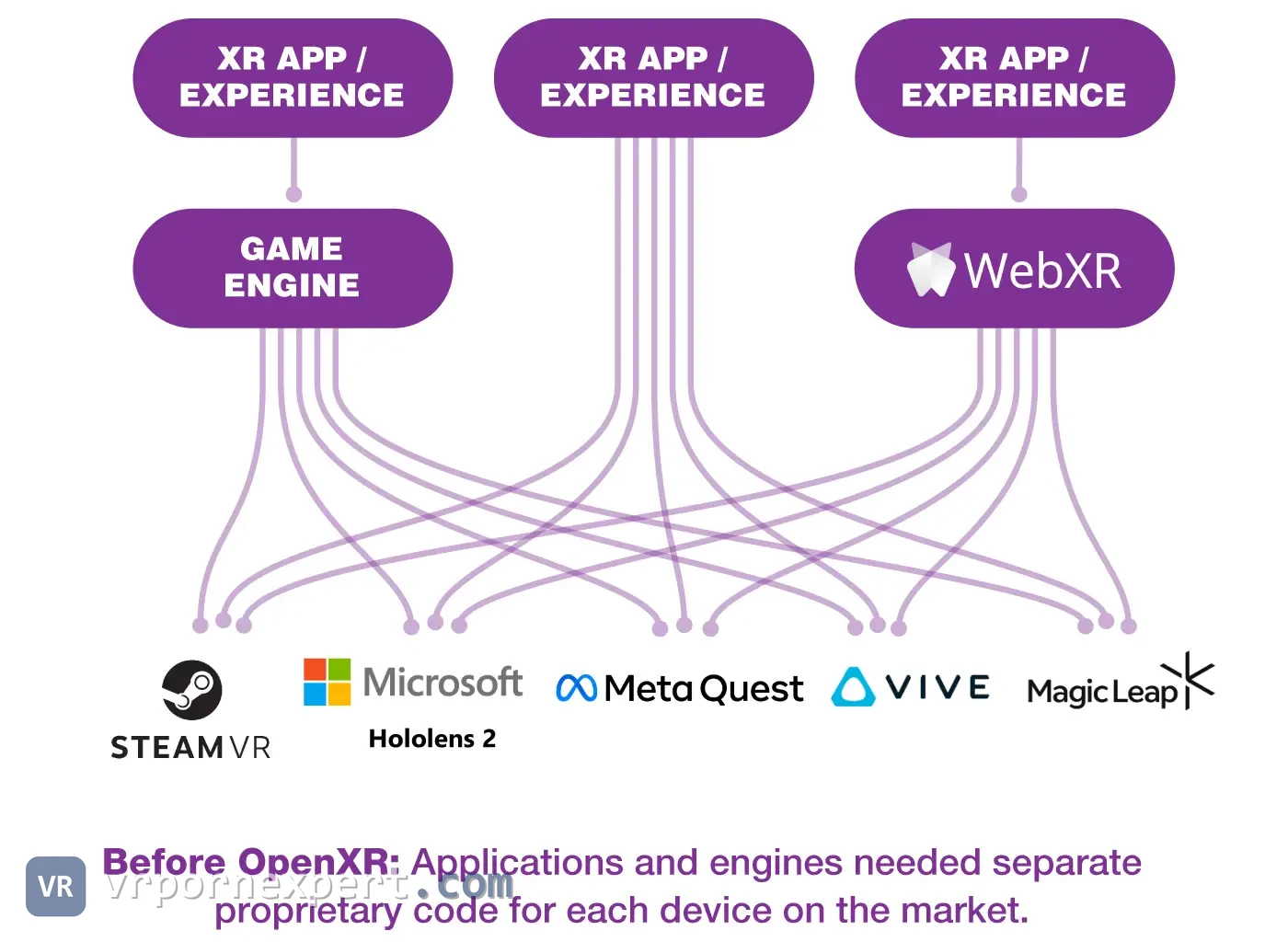

Before OpenXR, every VR app had to be built for a specific runtime:
- Oculus headsets → Oculus SDK
- SteamVR headsets (Vive, Index) → OpenVR/SteamVR SDK
- Windows Mixed Reality → WMR SDK
OpenXR replaced all three with one API, so a single build of an app runs on any headset. DeoVR on Steam uses OpenXR, which means it works with any PCVR headset regardless of brand.
PCVR VR Porn Site Compatibility
All 12 sites we tested work on PCVR, with none of the compatibility gaps PSVR2 has. What changes from site to site is the playback method and the quality:
| Site | Rating | PCVR Method | Max Res (PCVR) | Notes | Visit site |
|---|---|---|---|---|---|
| POVR | 8.5 | DeoVR / SLR App | 8K | Best overall; SteamVR + Oculus native | Visit |
 VR Bangers VR Bangers | 8.5 | DeoVR browser | 8K | Download recommended for best 8K quality | Visit |
 Virtual Real Porn Virtual Real Porn | 8.0 | DeoVR / own app | 8K | Manual setup for 8K; excellent depth | Visit |
 BaDoinkVR BaDoinkVR | 8.0 | DeoVR / download | 8K | High-bitrate downloads look best on PCVR | Visit |
 Virtual Taboo Virtual Taboo | 7.5 | DeoVR browser | 7K | Direct play via DeoVR; DRM-free files | Visit |
 Fap House VR Fap House VR | 7.5 | DeoVR / Skybox | 8K | Works via any OpenXR-compatible player | Visit |
 Dark Room VR Dark Room VR | 7.5 | DeoVR browser | 7K | 7K downloads for full quality on PCVR | Visit |
 VRPorn.com VRPorn.com | 7.5 | DeoVR / PLAY'A | 8K | Download + DeoVR for reliability | Visit |
 WankzVR WankzVR | 7.5 | DeoVR browser | 7K | HTC Vive explicitly supported | Visit |
 Adult Time VR Adult Time VR | 7.0 | DeoVR browser | 6K | High-bandwidth connection needed | Visit |
 Naughty America VR Naughty America VR | 7.0 | Direct download | 8K | Large files (10-20GB); PCVR handles them well | Visit |
 Brazzers VR Brazzers VR | 6.5 | DeoVR / SLR | 8K/120fps | 120fps only on PCVR with strong GPU | Visit |
How to Set Up OpenXR for VR Porn
Step 1: Set Your OpenXR Runtime
Your system can only have one active OpenXR runtime. Choose based on your headset:
| Headset | Recommended Runtime | How to Set |
|---|---|---|
| Valve Index / HTC Vive | SteamVR | SteamVR → Settings → Developer → Set as OpenXR runtime |
| Quest 3 via Link | Oculus / SteamVR | Oculus app → Settings → General → OpenXR Runtime |
| HP Reverb G2 / WMR | WMR for SteamVR | Install WMR for SteamVR from Steam, then set SteamVR as runtime |
| Pimax | PimaxXR or SteamVR | Pimax Client → Settings → Runtime |
| Bigscreen Beyond | SteamVR | Automatic: SteamVR is the only option |
| PSVR2 (PC adapter) | SteamVR | Automatic via PS VR2 app on Steam |
Step 2: Install DeoVR from Steam
- Open Steam → search "DeoVR" → Install (free).
- Launch SteamVR first, then DeoVR from your Steam library.
- DeoVR will use whatever OpenXR runtime is active.
Step 3: Performance Tweaks
PCVR exposes settings a standalone headset keeps hidden. The ones that matter for video:
- Supersampling: In SteamVR Settings → Video → increase render resolution to 150% if your GPU handles it. This is the single biggest quality improvement for VR porn.
- Reprojection: Enable motion smoothing in SteamVR. If you can't hit 90fps natively (common with 8K video), reprojection from 45fps looks smooth enough.
- OpenXR Toolkit: Install this free tool for fine-grained control: sharpening filters, foveated rendering, upscaling. Works with any OpenXR app including DeoVR.
- GPU priority: Close all background apps. VR video decoding at 8K is GPU-intensive. Chrome with 30 tabs will cause stuttering.
Oculus Rift and Rift S for VR Porn
The Rift is the oldest headset on this page and still fine for video. The original Rift came out in March 2016 and the Rift S in 2019. Facebook stopped making the Rift S in April 2021 and said it would build no more PC-only headsets after it. Neither one works without a PC, so the setup above applies, with a few Rift details on top.
The runtime lives in Meta's PC app. The old Oculus app is now called Meta Horizon Link (it was Meta Quest Link in between), and a Rift runs through it even when you watch from Steam. Before SteamVR will start, open the app's Settings, then General, and turn on Unknown Sources; Valve's own setup page for the Rift asks for exactly that. From there Step 1 and Step 2 work as written, SteamVR first and DeoVR second.
DeoVR from Steam is free, and the rest of this guide assumes it because its built-in browser opens the sites directly. HereSphere costs $29.99 on Steam and also runs through SteamVR. Its whole pitch is correcting how the recorded image is projected onto the headset display, so it earns its price on a folder of downloads more than on streaming.
If you own the original Rift, know this before you reinstall Windows. In July 2025 users on Meta's community forum reported that the PC app no longer lists the CV1 on its setup screen. A CV1 that was already set up keeps working; a fresh install on a new PC is where it gets stuck. The Rift S is still supported in the current app.
What a Rift Panel Can Show
The arithmetic is the one from our Quest 2 blurriness breakdown. Half the file width goes to each eye and is spread over 180 degrees, and the headset shows only its slice of that. On a Rift the slice is narrow, about 87 degrees across on the CV1 and 88 on the Rift S, and the panels are small: 1080 pixels wide per eye on the CV1, 1280 on the Rift S.
| Source file | Rift CV1 (1080 px panel) | Rift S (1280 px panel) |
|---|---|---|
| 8K, 7680 wide | 1856 px, 172% | 1877 px, 147% |
| 6K, 5760 wide | 1392 px, 129% | 1408 px, 110% |
| 5K, 5120 wide | 1237 px, 115% | 1252 px, 98% |
| 4K, 3840 wide | 928 px, 86% | 939 px, 73% |
The Rift S is matched at 5K. The CV1 runs out of panel between 4K and 5K. An 8K file is past the ceiling on both: it plays, and the extra pixels never reach your eye. On a Rift, take the 5K or 6K version when a site offers one. It looks the same and leaves the GPU less to decode, which is also the fix for 8K stutter in the troubleshooting table below.
PCVR Headset Comparison for VR Porn
Our full headset comparison puts the PCVR options next to Quest, PSVR2 and the rest on resolution, weight and price.
| Headset | Resolution | Display | FOV | Best For |
|---|---|---|---|---|
| Bigscreen Beyond | 2560×2560/eye | Micro-OLED | ~90° | Best image quality; compact form factor |
| Valve Index | 1440×1600/eye | LCD | 130° | Widest FOV; excellent audio |
| HP Reverb G2 | 2160×2160/eye | LCD | 98° | Best budget PCVR for clarity |
| Quest 3 via Link | 2064×2208/eye | LCD | 110° | Versatility (standalone + PCVR) |
| Pimax Crystal | 2880×2880/eye | Mini-LED | 120° | Highest resolution PCVR |
| PSVR2 (PC adapter) | 2000×2040/eye | OLED | 110° | OLED blacks if you already own one |
Troubleshooting PCVR VR Porn
| Problem | Cause | Fix |
|---|---|---|
| DeoVR won't launch in VR | Wrong OpenXR runtime | Set correct runtime for your headset (see table above) |
| Stuttering at 8K | GPU can't decode + render | Lower supersampling; enable reprojection; try 6K file |
| Black screen in DeoVR | SteamVR not running | Launch SteamVR before DeoVR |
| Low resolution despite 8K file | Supersampling too low | Increase SteamVR render resolution to 150%+ |
| Audio only in one ear | Spatial audio mismatch | In DeoVR settings → Audio → set to Stereo (not Ambisonics) |
| Quest 3 Link looks blurry | USB bandwidth / encode bitrate | Use USB 3.0 cable; increase Oculus Link bitrate to 500Mbps in Debug Tool |
FAQ
Do I need to know about OpenXR to watch VR porn?
Not really. If you install DeoVR from Steam and it works, you're done. OpenXR runs in the background. This guide is for when things don't work, or when you want to squeeze maximum quality out of your PCVR setup.
Is PCVR better than Quest 3 standalone for VR porn?
Yes, if you have a strong GPU. PCVR can play 8K files at native resolution with no compression. Quest 3 standalone compresses during Wi-Fi streaming, and its mobile chip can't match a desktop RTX GPU for decode quality. The trade-off is convenience: Quest 3 standalone is zero-setup.
What GPU do I need for 8K VR porn?
Minimum RTX 3060 for smooth 8K playback. RTX 3080 or better for 8K + supersampling. AMD GPUs work but NVIDIA's NVDEC hardware decoder handles VR video better.
Can I use Quest 3 as a PCVR headset for VR porn?
Yes. Connect via USB (Oculus Link) or wirelessly (Air Link). Install DeoVR from Steam, set Oculus as your OpenXR runtime, and you get PCVR quality with Quest 3's display. You do need a gaming PC for it.
Can I still watch VR porn on an Oculus Rift or Rift S?
Yes, through a PC. Install Meta Horizon Link (the old Oculus app), turn on Unknown Sources, start SteamVR, then DeoVR from Steam. Pick 5K or 6K files: the Rift S is matched at about 5K and the original Rift a little below that, so 8K adds download size and nothing you can see.