
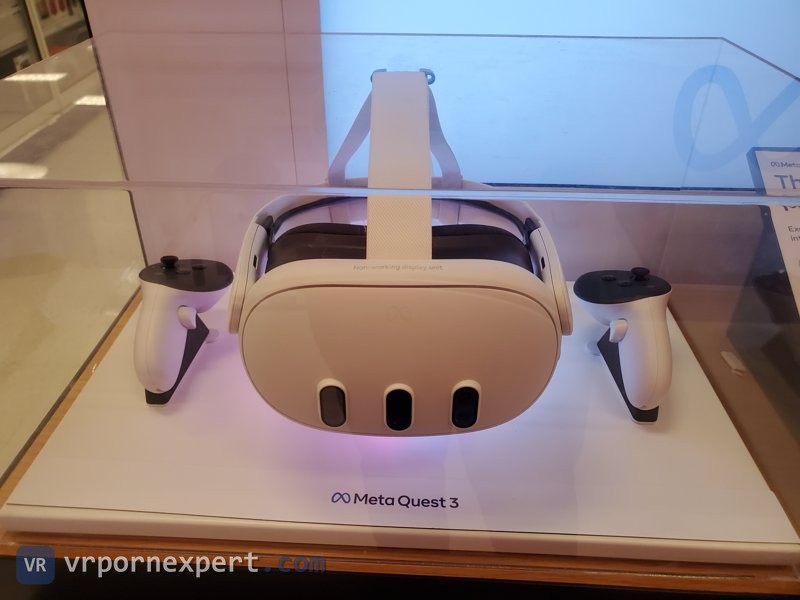
Meta Quest is what almost everyone reading this already owns. Quest 3 if you bought in the last two years, Quest 2 if you got in early or picked one up used. If the box says Oculus Quest 2, it is the same headset: Meta started retiring the Oculus name at the end of 2021 and changed nothing inside. Both run every site on this page, both run them the same way, and neither needs a PC: the headset has a browser, the browser plays the scene.
What changes between the two generations is not which sites work. It is how much of the picture survives the trip from the file to your eyes, and that turns out to be arithmetic rather than opinion. It is also why the same scene looks stunning to one person and soft to another on what they both call "a Quest".
We keep our own parse of these catalogs, so the resolution counts below are scenes we counted, not numbers lifted off a tour page.
Best VR porn sites for Meta Quest, ranked
Ordered by our overall score, with the reason each one belongs on a Quest specifically. The scoring itself is explained in how we rate VR porn sites.
A hub rather than a studio: scenes pulled from across the industry, updated daily, one login. POVR advertises 24,400+ scenes from 130+ studios, and that is its number rather than ours, because aggregator front pages are not something we parse. What we tested is playback, and 8K downloads looked crisp even on a Quest 2. Passthrough here is a real section rather than a demo, which is the one thing a Quest 3 does that a Quest 2 cannot fake. Tagging is inconsistent and the VR theater skips older material, so it is a library to browse rather than to search.
Five sites on one login from a Prague studio that has shot native VR since 2015. Of the 973 scenes where a resolution is published, 956 are 8K. That is the highest confirmed 8K share of any catalog this size that we parse. Czech AR is built for Quest 3 passthrough, and downloads come DRM free in headset native formats, so nothing gets in the way of copying a file onto the headset. Six months works out near $14 a month.
European studio, shooting in-house since 2016, still shipping weekly after nearly a decade. 566 scenes in our parse, 118 of them publishing 8K, passthrough supported. The catch is the plan rather than the content: the $19.99 month is streaming only, and unlimited downloads need the annual at about $9.99 a month. On a Quest that matters more than it sounds, because downloading is how you sidestep the whole Wi-Fi problem.
The most Quest-specific claim in our whole catalog: everything shot since 2024 runs up to 8192x4096 at 60fps, which is exactly the headroom a Quest 3 panel wants. 771 scenes parsed, 212 at 8K and 321 at 7K, and over 700 of them carry interactive toy scripts. The 2017 to 2020 half tops out at 4K or 5K and looks it. Every preview on the site is blurred until you clear a third-party age check, which is irritating but does not touch playback.
419 scenes and all 419 publish 8K. It is the only catalog we parse with no low-resolution tail at all, which on a Quest means you can pick a scene at random instead of sorting by date first. Headset coverage is unusually wide for a young brand: Quest, PICO 4, Vive XR Elite, PSVR2 and a native Vision Pro build. Unlimited streaming and downloads on every plan. The travel premise is partly set dressing.
8K at 60fps with the PLAY'A app doing the heavy lifting on Quest, offline playback included. Big mainstream cast. Two things to know before you subscribe: downloads are capped at 10 a day, and the signup flow cross-sells sister sites hard enough that you should read the checkboxes.
The site ships its own player, VirtualRealPlayer, on the phone stores; on a Quest you watch through the browser like everywhere else. 1,080+ videos, 12K on the tour and 8K on the newer material, teledildonics support and dual-POV scenes, unlimited downloads on every tier. Updates are not always steady and parts of the site push ads harder than they need to.
This is the one we would point a Quest 2 owner at, and the reason is bitrate rather than resolution. WankzVR pushes 40+ Mbps at 7K, and 983 of the 1,065 scenes that publish a resolution are 6K or better. Run the numbers further down this page and you will see a Quest 2 panel is already saturated at 7K, so those extra megabits buy more visible sharpness than an 8K badge would. Membership also drags in 17,000+ scenes from the rest of the POVR network. Pre-2020 scenes are rougher and can make people queasy.
Every site we run on Quest, side by side
Sixteen sites, all working on Quest 3 and on Quest 2. The route column is how you actually get a scene playing in the headset. The resolution column is what the catalog publishes, counted by us wherever we hold a parse of it.
| Site | Score | Route on Quest | Resolution in the catalog | Downloads | Visit site |
|---|---|---|---|---|---|
 POVR POVR | 8.5 | Browser, passthrough on Quest 3 | 4K to 8K, aggregator catalog we do not parse | Unlimited | Visit |
 Czech VR Network Czech VR Network | 8.4 | DeoVR browser, Quest 3 passthrough on Czech AR | 956 of 973 published scenes are 8K | Unlimited, DRM free | Visit |
 Reality Lovers Reality Lovers | 8.2 | DeoVR browser, passthrough supported | 118 confirmed 8K of 566 scenes | Unlimited on annual only | Visit |
 RealJamVR RealJamVR | 8.0 | Headset browser via WebXR, up to 8192x4096 at 60fps | 212 at 8K, 321 at 7K, 771 parsed | Not stated | Visit |
 Fuck Pass VR Fuck Pass VR | 8.0 | Browser, native builds for Quest and Vision Pro | 419 of 419 scenes publish 8K | Unlimited on every plan | Visit |
 VR Bangers VR Bangers | 8.0 | PLAY'A app plus browser | 8K at 60fps on newer scenes | 10 a day | Visit |
 Virtual Real Porn Virtual Real Porn | 8.0 | Browser, own player app on phones | 12K advertised, 8K on newer material | Unlimited | Visit |
 Adult Time VR Adult Time VR | 7.8 | Browser | 970 of 1,298 VR scenes master at 8K | Annual plan only | Visit |
 WankzVR WankzVR | 7.5 | Browser | 983 of 1,065 published scenes are 6K or better | Unlimited | Visit |
 VRPorn.com VRPorn.com | 7.5 | PLAY'A app or DeoVR | 5K to 8K, aggregator catalog we do not parse | 20 a day | Visit |
 BaDoinkVR BaDoinkVR | 7.5 | Browser plus VR Theater mode | 306 at 8K, 306 at 7K, 458 at 4K | Unlimited | Visit |
 Virtual Taboo Virtual Taboo | 7.5 | DeoVR browser | 7K at 60fps | Unlimited, DRM free | Visit |
 Fap House VR Fap House VR | 7.5 | DeoVR or Skybox browser | Mixed, aggregator catalog we do not parse | Not stated | Visit |
 Dark Room VR Dark Room VR | 7.5 | DeoVR browser | 7K | Unlimited | Visit |
 Naughty America VR Naughty America VR | 7.0 | Browser | 328 confirmed 8K of 1,316 scenes | Unlimited | Visit |
 Brazzers VR Brazzers VR | 6.5 | DeoVR browser | 49 scenes, 6 of the 30 that publish a resolution are 8K | Unlimited | Visit |
Where a cell says "of N scenes", N is the number of scenes in that catalog that publish a resolution at all. Older material from before a studio started tagging its releases is not counted either way. Per-site breakdowns sit on our 8K VR porn page.
Quest 3 vs Quest 2 for VR porn
Both headsets play the same files from the same sites. Here is what actually differs.
| Feature | Quest 2 | Quest 3 | Does it matter for VR porn? |
|---|---|---|---|
| Resolution per eye | 1832 x 1920 | 2064 x 2208 | Yes, and less than people expect. The arithmetic is below |
| Lenses | Fresnel | Pancake | Yes. Wider sweet spot, far fewer god rays in dark scenes |
| Horizontal FOV | up to 96 degrees | 110 degrees | Yes, and it cuts both ways: a wider view spreads the same pixels thinner |
| Passthrough | Grainy black and white | Color, high resolution | Only if you want passthrough scenes, which today means POVR, Czech AR and Reality Lovers |
| Weight | 503 g | 515 g | Barely. Balance matters more than grams, and Quest 3 is better balanced |
| Price, August 2026 | Used market only | $499.99 for 512 GB | A used Quest 2 is still the cheapest honest way into VR porn |
Our verdict has not moved: the pancake lenses are the upgrade, not the pixel count. Already own a Quest 2, there is no urgency. Buying today, buy the Quest 3. The 3S is not the middle option people assume: it carries the same 1832 x 1920 panels and the same Fresnel lenses as a Quest 2, in a newer body. All of it is laid out in the best VR headset for porn comparison.
Why VR porn looks blurry on Quest 2
This is the most common complaint we get about Quest 2, and the headset is usually not the culprit. Here is the arithmetic that explains it.
A 180 degree side by side file splits its width between your two eyes. An 8K scene is 7680 pixels wide, so each eye gets 3840, and those 3840 pixels are stretched across the full 180 degrees of the sphere. Your headset only shows a slice of that sphere at once: 96 degrees on a Quest 2, 110 on a Quest 3. So what actually lands in front of your eye is 3840 multiplied by the slice you can see.
| Source file | Pixels per eye | Landing in a Quest 2 view | Against a 1832 pixel panel |
|---|---|---|---|
| 8K, 7680 wide | 3840 | 2048 | 112%, more source than panel |
| 7K, 6720 wide | 3360 | 1792 | 98%, effectively a match |
| 6K, 5760 wide | 2880 | 1536 | 84%, starting to soften |
| 5K, 5120 wide | 2560 | 1365 | 75%, visibly soft |
| 4K, 3840 wide | 1920 | 1024 | 56%, the panel shows twice what the file holds |
Read that table twice. It settles two arguments at once.
The first: a Quest 2 is saturated at 7K. Paying more for a site because it advertises 8K buys you nothing on a Quest 2 that a 7K file does not already deliver. What it does buy is a catalog that is not sitting on a 4K back archive, and that is the number worth checking before you subscribe.
The second: if a scene looks soft, the odds are it is a 4K or 5K release from a studio's early years rather than your hardware. Nearly every veteran catalog has one. BaDoinkVR publishes 458 scenes at 4K next to its 306 at 8K. RealJamVR's pre-2021 half tops out at 4K or 5K. Lethal Hardcore VR keeps 104 4K scenes behind its 234 8K ones. Sorting a site by newest is a better sharpness filter than anything in the headset settings.
After the file itself, in order of how much difference they make:
- Streaming bitrate. Streaming re-compresses. A downloaded 7K file at 40+ Mbps beats a streamed 8K one on a busy connection, every time. If a scene looks worse today than it did yesterday, this is why.
- Wi-Fi band. 2.4GHz cannot carry VR video. 5GHz is not optional, and the headset should be in the same room as the router if you can manage it.
- Lens spacing. Quest 2 lenses physically slide between fixed positions. Wrong spacing for your face and the stereo image never fully locks, which reads as blur.
- Sweet spot. Fresnel lenses are sharp in the middle and nowhere else. If the headset has slid down your nose mid-scene, the edges go first. Push it back up.
How to watch VR porn on Quest 3 and Quest 2
All three methods work identically on both headsets.
Method 1: stream through DeoVR
How most people watch. Nothing to manage, no cables.
- Install DeoVR from the Meta Quest Store. Free on both headsets.
- Open DeoVR and use its built-in browser to reach the site.
- Log in, pick a scene, press play.
- DeoVR usually detects the projection. If the image looks flat or warped, set it to 180 degree SBS 3D by hand.
Speed you need: 25 Mbps for 4K, 50 for 6K, 100+ for 8K, always on 5GHz. Deeper DeoVR settings and a per-site compatibility table live on our DeoVR porn sites page.
Method 2: download and play locally
Streaming compresses. To get the sharpest picture a file can give, put the file on the headset.
- On your PC, download the scene at the highest resolution offered.
- Connect the headset with a USB-C cable.
- Put it on and tap Allow on the USB permission prompt.
- On the PC, open the headset in File Explorer and go to
Internal Storage / Movies /. - Copy the file there.
- Open DeoVR or Skybox on the headset, browse local files, play.
Storage: 8K scenes run 5 to 15 GB each, so a 256GB headset holds roughly 15 to 20 of them. On a 128GB Quest 2 you will be deleting as you go, which is an argument for streaming 7K instead.
Method 3: a site's own app
A few sites skip the browser entirely:
- PLAY'A covers VR Bangers and VR Conk, and VRPorn.com names it as an option
- Virtual Real Porn ships VirtualRealPlayer, on the phone stores rather than the Quest store
- Skybox is what several sites point you at for downloaded files, Fap House VR among them
These run smoother than a browser tab, and they lock you into one ecosystem. Subscribe to more than one site and DeoVR stays the practical choice.
Settings worth changing
Out of the box both headsets are fine. These are the changes that show up on screen.
- Refresh rate to 90Hz. Settings, System, Display. Both headsets default lower than they can run.
- Lens spacing. Quest 3 has a continuous slider from 58 to 71mm; on Quest 2 you push the lenses between fixed positions. Wrong spacing means headaches and a stereo image that never quite settles.
- Guardian to stationary. Seated viewing plus a roomscale boundary means the grid appears every time you lean.
- 5GHz Wi-Fi, ideally Wi-Fi 6. Non-negotiable if you stream anything above 4K.
- Developer mode. Only if you plan to sideload a player. Free Meta developer account, two minutes.
Problems and fixes
| Problem | Cause | Fix |
|---|---|---|
| Soft picture on Quest 2 | 4K or 5K source file | Sort the site by newest, or pick a catalog with a high 6K+ share |
| Sharp in the middle, mush at the edges | Off the Fresnel sweet spot on Quest 2 | Reseat the headset higher and tighten the top strap |
| Video looks flat, no depth | Wrong projection | Set DeoVR to 180 degree SBS 3D by hand |
| Stutter and buffering | 2.4GHz Wi-Fi or a busy connection | Move to 5GHz, get closer to the router, or download the file |
| Headset gets hot and frames drop | 8K decoding in a warm room | Take a break, point a fan at it, or drop to a 6K version |
| Downloaded file does not appear | Wrong folder | It has to be in /Movies/, not Downloads and not the root |
| Guardian grid keeps appearing | Roomscale boundary while seated | Switch the guardian to stationary |
| USB transfer does nothing | Permission never granted | Put the headset on and tap Allow on the prompt |
FAQ
Can I watch VR porn on Quest 3 or Quest 2 without a PC?
Yes, on both. Quest is standalone: install DeoVR, use its browser, stream over Wi-Fi. A PC is only useful for downloading files and copying them across for the sharpest possible picture.
Is Meta Quest the same as Oculus Quest for VR porn?
Yes. The Oculus Quest 2 and the Meta Quest 2 are one headset under two names, renamed after Facebook became Meta in 2021. It runs DeoVR and every site in the table above exactly as a Meta-branded one does. Only the first Quest from 2019 is a different, older headset, and we do not test on it.
What is the best VR porn site for Meta Quest?
Czech VR Network is our highest rated at 8.5, and it publishes 8K on 956 of the 973 scenes that carry a resolution. POVR rates 8.3 and is the one to pick for passthrough scenes on Quest 3 and for catalog size.
Is 8K worth it on a Quest 2?
Not on its own. A Quest 2 panel is already saturated at 7K, so an 8K file gives you headroom rather than visible detail. What matters more is that the catalog is not mostly 4K back material, and that you are not streaming it over a congested connection.
Why does VR porn look blurry on my Quest 2?
Nine times out of ten it is the file, not the headset: a 4K release lands about 1024 pixels on a panel that can show 1832. After that, check you are on 5GHz Wi-Fi, that the lens spacing is set for your face, and that the headset sits high enough that you are looking through the sweet spot.
Is Quest 3 better than PSVR2 for VR porn?
For convenience, nothing is close. Quest runs DeoVR out of the box. On a PS5 you cannot watch adult VR at all: there is no adult app store and the browser is not a way round it. Making a PSVR2 work means the $59.99 PC Adapter, a DisplayPort cable Sony does not include, a Windows PC and DeoVR running on it. The OLED panel is a genuine advantage, so it is worth the trouble if you already own the headset: setup is in the PSVR2 porn guide.
How much storage do I need on a Quest?
If you only stream, 128GB is plenty. If you download, budget 5 to 15 GB per 8K scene: 256GB holds 15 to 20, 512GB holds 30 to 40. On a 128GB Quest 2 downloading is a rotation, not a library.
Is watching VR porn on a Quest private?
Reasonably. DeoVR browsing history can be cleared. Downloaded files sit in /Movies/ and anyone browsing the headset storage will find them. For the most privacy: stream only, clear DeoVR browser data after each session, and use a VPN.